ColorMatch Studio · Offline v1 download
Prepare your engraving image offline. Crop your photo, adjust brightness and contrast, and download a PNG.
$4.99 USD · One-time digital download
Tested in Mac Chrome or Windows 11 Edge.
Studio prepares images offline; it does not provide laser settings or machine control. The historical test library is separate from this download.
View on Etsy (opens in a new tab) Compatibility and download details ColorMatch Studio is an offline image-preparation tool for desktop Google Chrome on macOS or Microsoft Edge on Windows 11. Open a PNG, JPG or still WebP, crop and rotate, adjust brightness and contrast, then choose grayscale, black-and-white threshold or Floyd–Steinberg dithering. Compare your edits and download PNG artwork.
Tested offline in desktop Google Chrome on macOS and Microsoft Edge on Windows 11. Other browser/operating-system combinations and actual phones/tablets are unverified.
This version supplies no laser settings, machine control, physical-color prediction or verified material recipes.
Extract the ZIP first. Save your downloads before closing or refreshing. See the full limits, license and download details on Etsy.
Actual app preview · Illustrative sample, not an engraved result. ColorMatch · The evidence library
Recorded laser tests with photos Two recorded tests, with photos. Each shows the machine, material and settings used. Your results will vary: use them as a starting point, then record your own test with the free card.
The original ColorMatch app opens to a separate sign-in screen. Sign-in is required to continue. Its full records are not shown on this public page. Features and record access after sign-in are unverified.
Historical library context
Original app library: 22 Library Entries · 20 Tested · 2 Reference
Historical totals do not confirm current record access or independently verified results.
Black metal · Recorded physical test xTool F2 Ultra · MOPA IR What do Tested and Reference mean?
Tested A recorded physical run with its setup and result. It does not guarantee your result.
Reference Starting information or research, without a confirmed physical result. Tested does not mean independently verified. Check the machine, material and evidence for the individual run.
Real tests. Photos included. These are recorded results, not recipes guaranteed for your setup.
Tested
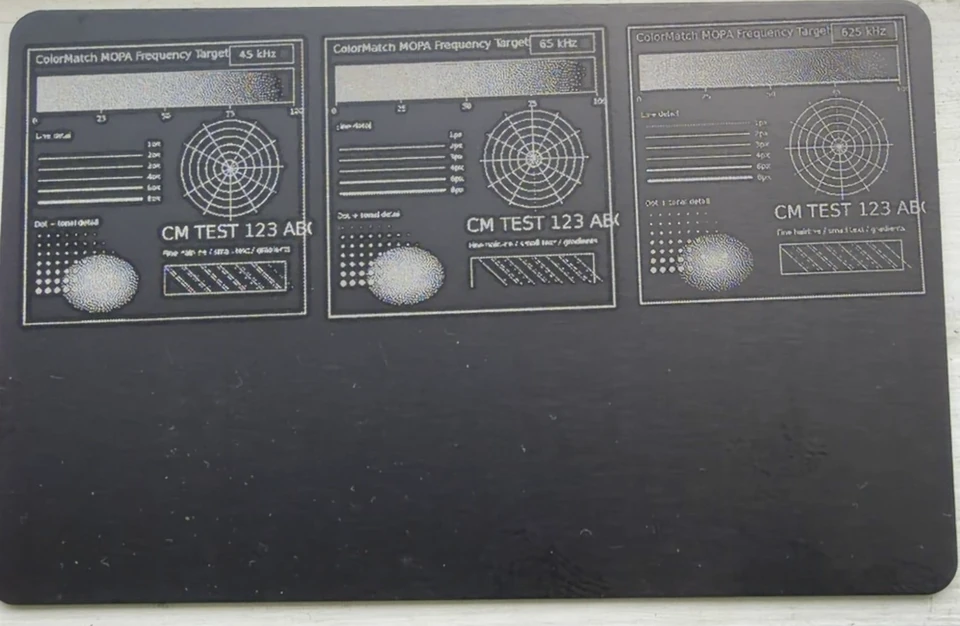
Fine detail on black metal
Machine xTool F2 Ultra · MOPA IR
Material Black metal card · 0.8 mm
Settings 80% power · 100 µs dot · 300 DPI · 200 ns · 1 pass. Frequency: 45, 65 and 625 kHz. Jarvis, bidirectional. Three frequencies compared on one card. One recorded test; results vary.
View full photo Tested
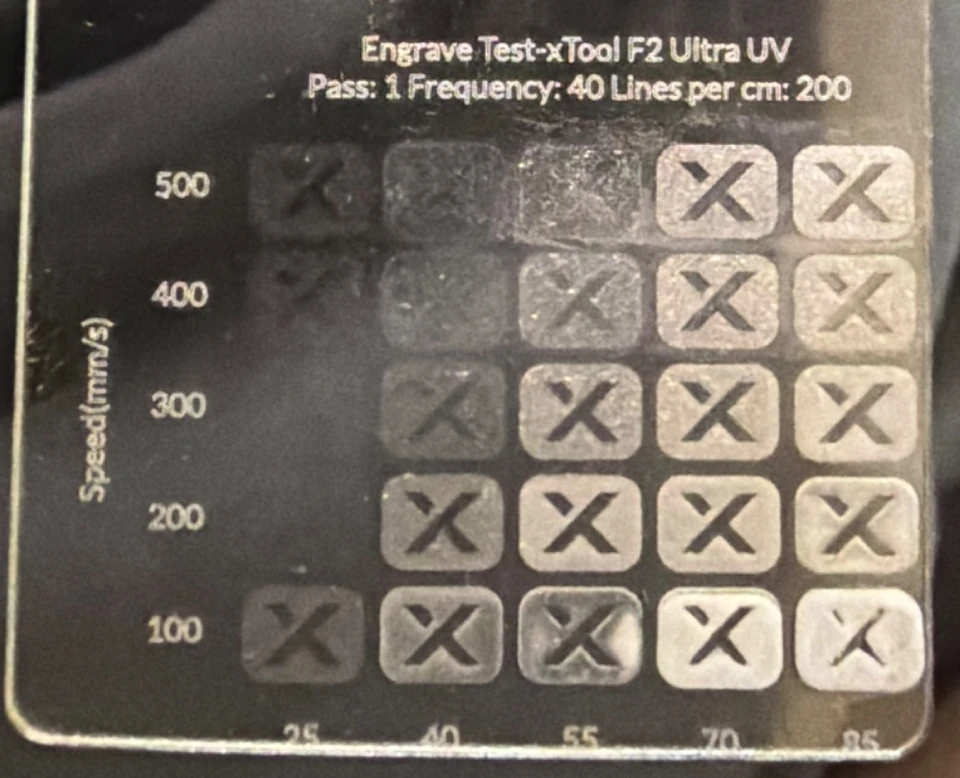
A test grid on clear acrylic
Machine xTool F2 Ultra · UV
Material Clear acrylic · thickness not recorded
Settings 25/40/55/70/85% power · 100–500 mm/s · 1 pass · 40 kHz · 200 lines/cm. Power and speed compared across one grid. One recorded test; results vary.
View full photo